
Cursor Pricing 2026: Free vs Pro vs Ultra — Which Plan?
Cursor Free, Pro ($20), Pro+ ($60), Ultra ($200) compared. When to upgrade, what you actually get, and how to avoid hitting request limits.

Cursor is a popular Agentic AI coding tool, helping developers improve productivity, and even helping SaaS founders with no coding background build fully functional systems. Unlike other agentic tools like Copilot or Claude Code which are primarily editor extensions, Cursor is a standalone IDE (Integrated Development Environment) that replaces the need for using VS Code (it is actually a fork of VS Code). It melds a native coding experience with a AI-first conversational coding solution.
Agentic AI tools like Cursor speed development and improve developer performance. The LLM agents inside Cursor do not just blindly add code to your repository. When prompted with a code change, the AI Agents read your existing code, write code that fits into your existing codebase - matching styles and reading across files and modules to ensure that the generated code is compatible with the entire repository.
But, how much does such an AI tool cost? While the Cursor AI pricing page provides the basic details, this post aims to break down the available plans so that your team can determine the price point most appropriate for your usage needs and help you understand when you need to upgrade to a more advanced plan.
#What Cursor Brings to the Table
To understand the pricing of Cursor, it is important to understand the features that Cursor brings to your development team. As previously mentioned, Cursor is a full-fledged IDE that developers can use for coding. The AI Agents inside Cursor have many features that improve coding workflows:
- Full repository awareness: Code analysis isn't limited to a single function or file—Cursor understands your full repository and how changes affect other files, modules, and dependencies.
- MCP integrations: Cursor has native Model Context Protocol support to pull context from outside your repo—APIs, documentation, databases, or internal tools.
- Multiple file changes: Plans and applies multi-file diffs when creating code.
- Natural language: Build code using plain English prompts.
- File safety: Git-based file safety makes it easy to review, accept, reject, or roll back changes.
No matter the pricing tier - these features are included with your Cursor subscription. The major differences between the Cursor pricing plans comes from how much Agentic access is provided, but we will also dig into the subtle differences.
We'll kick off our review of plans designed for a single developer: what Cursor calls "Individual plans." These plans are best for a founder or developer coding alone on a project.
#Hobby Tier: Starting with Cursor
Never used Cursor? The free "Hobby" tier lets you test the tool and see if Cursor's workflows fit your existing processes. Being free, the Hobby plan provides very limited access:
- Tab completions: Cursor's coding autocomplete feature lets you build faster - by tabbing the suggested autocompletes from Cursor.
- Agent requests: Chat with Cursor's agents to code or debug your code.
This is a great way to experiment with Cursor before buying a paid plan. As you might expect, the number of Agent requests is small—you may complete one feature (or only part of one) before running out of credits and being prompted to upgrade.
Get stuck mid-feature on the Hobby tier? You can activate a 7-day free Pro trial to help you complete your project.
#Pro ($20/month): The Sweet Spot for Most Founders
The Pro plan is Cursor's most popular tier: at $20/month for one user, it's an easy entry point that won't break the bank. You get everything in Hobby, plus higher limits:
- Unlimited tab completions: Tab completions are virtually unlimited on the Pro plan.
- Extended limits on Agent Requests: While not unlimited, the number of Agentic Requests is much higher.
The Pro plan also introduces the ability to run Background Agents. You can ask Cursor to work on a task in the background, while you continue to use the Agent in your current coding. The Background agent works asynchronously to the developer's work - coming back only when it has an answer, or has a clarifying question.
The number of Agent Requests and Background Agents provided in Cursor's Pro plan are provided quantitatively. When an Agentic call is made, Cursor breaks the task up for different agents, and utilizes common LLMs (OpenAI, Gemini and Claude are commonly used) to 'solve' the problem. The Pro plan includes a fixed monthly allowance of AI compute, roughly equivalent to what Cursor internally budgets for a $20/month user. Token usage is abstracted away from the developer—there is no visible token counting, only usage-based limits.
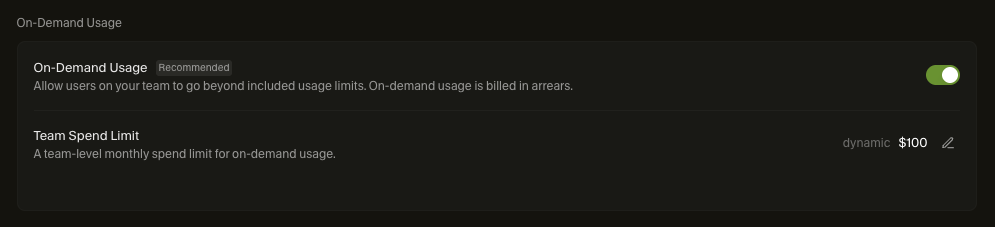
Should a developer utilize all of the Agent requests allocated in a month, there are two options: the team can either block overage charges, and advanced agent features pause or degrade until the next billing cycle, or the team can cap the amount of overage charges that can be accrued in the month.
#Pro+ ($60/month) and Ultra ($200/month): For Heavy Users
Once developers begin using Cursor, they may find that they become heavy users, and they reach the limits of the Pro plan. The Pro+ and Ultra plans are built for these developers.
For heavy users of Cursor, the Pro+ plan (at $60 per month) provides everything in the Pro plan, but provides 3x more usage with the top models - allowing for more background tasks, and Agentic problem solving.
For extremely heavy users, Cursor's Ultra plan provides 20x the usage of the Pro plan - for $200 a month.
#Team and Enterprise plans
For side projects or solo development, Individual plans make sense—you know your usage and can pick accordingly. But as your team grows, managing individual plans becomes a bookkeeping nightmare and introduces security concerns.
This is where Cursor's team and enterprise plans fit in.
Cursor's team plan costs $40 per month per user, fitting between Pro and Pro+ individual accounts.
Beyond centralized billing and easy team member management, the major advantage is improved data isolation and privacy controls. Prompts and code analyzed on a Teams account are not used to train models.
The biggest privacy win? MCP access is controlled at the team level. Proprietary data from MCPs stays managed by your organization—it can't leak to individual accounts when developers come and go.
For teams with stricter privacy requirements, the Enterprise plan adds region-specific data handling (data stays in your country/region), audit logging, and deeper admin visibility. Enterprise pricing isn't published—you'll need to work with Cursor's sales team for a custom contract.
#Addons: Bugbot
Cursor offers Bugbot - a product that scans every PR on Github for potential bugs. It acts like a senior dev that reviews the code, looking for bugs in code being submitted for review. The Pro and Teams versions of Bugbot cost $40 per user per month, in addition to the Cursor subscription. While this may seem expensive at first, Bugbot delivers the highest ROI for teams with junior or mid-level developers by catching common bugs before senior engineers need to review the code. It acts as a first-pass reviewer, reducing review noise and protecting senior developer time.
#Further extending Cursor: BrainGrid's spec driven development
Cursor's Agentic coding AI raises the bar and improves productivity of development teams. But all developers who use AI know about falling into 'rabbit holes' where the AI is just not interpreting the prompts well, and hours are spent getting the AI back on track and to have it stop making similar mistakes over and over.
Many times, features are built at the prompt with little forethought or planning. As the feature evolves, so too do the prompts and the underlying code.
In traditional development processes, Product Managers work with the stakeholders to plan what the feature looks like, what it should (and should not) do, and build a roadmap of how the feature will evolve. BrainGrid acts as a product-management layer for AI coding workflows - helping developers take ideas for features, and building requirements around the feature. BrainGrid asks clarifying questions to help the product owner better understand what is being built, and what is out of scope. This spec driven development leads to the creation of a requirements document that describes the scope of the feature and what is going to be built. The team can analyze and make changes.
Once the requirements document is approved, BrainGrid creates tasks with prompts that can be fed directly into Cursor. The prompts are highly detailed, which means that there are fewer back and forth iterations with the Agentic AI to actually build the feature. See an example of feature building with BrainGrid and Cursor in our Windsurf vs. Cursor comparison.
Connecting the BrainGrid MCP into Cursor ensures that features are better understood and fleshed out - instead of just building at the prompt. This results in faster development, fewer rabbit holes, and higher productivity.
Starting at $10/month/user (to $75/month/user for enterprises), BrainGrid's product driven specifications gives Cursor additional superpowers, further accelerating your team's development productivity.
#Wrapping up
Cursor's paid plans start at $20/month and scale to $200/month for the Ultra tier. For development teams, the Team and Enterprise plans simplify billing while adding privacy and security controls. And for teams going all-in with agentic coding, spec-driven development tools like BrainGrid help you build better prompts—leading to focused code and fewer AI rabbit holes.
To learn more, visit Cursor.ai or explore spec-driven development at BrainGrid.ai.
#FAQ
#How much does Cursor Team cost?
Cursor Team starts at $40/month per user.
#How costly is Cursor?
| Plan | Price | Best For |
|---|---|---|
| Hobby | Free | Testing Cursor before committing |
| Pro | $20/mo | Solo founders shipping MVPs |
| Pro+ | $60/mo | Heavy daily users hitting Pro limits |
| Ultra | $200/mo | Full-time AI-assisted development |
| Team | $40/user/mo | Startups with 2+ developers |
| Enterprise | Custom | Regulated industries, large orgs |
#Is Cursor AI free or paid?
There's a free Hobby tier, but paid plans start at $20/month.
#Is Cursor better than Copilot?
They're different tools. Copilot generates code snippets; Cursor understands your full repository and builds code that fits your existing codebase.
#Do you need a subscription for Cursor?
Yes, though the Hobby tier is free for testing.
#Is Cursor's free plan good?
It's like a taste of ice cream—enough to evaluate, but most real-world development requires a paid plan.
#How much do different models cost in Cursor?
By default, Cursor uses Auto mode, that uses internal tooling to pick the bets agent for a given task. This can be overridden, and developers can choose specific Agents (like Opus 4.5, Sonnet 4.5, ChatGPT 5.2, and Gemini 3) for all queries. Cursor has published cost per million tokens for many of the most popular and powerful models in their documentation
About the Author
Doug has been helping developers build across mobile, DevOps, and AI for the last 20+ years. An O'Reilly author, international speaker, and a prolific blogger, he relishes in simplifying the complex.
Want to discuss AI coding workflows or share your experiences? Find me on X or connect on LinkedIn.
Keep Reading

Ready to build without the back-and-forth?
Turn messy thoughts into engineering-grade prompts that coding agents can nail the first time.
Re-love coding with AI