
Windsurf vs Cursor 2026: Full Comparison for AI Coding
Windsurf vs Cursor compared on pricing, AI features, code quality, and IDE experience. Which AI coding assistant is right for your workflow?
You have more product ideas than hours in the day. AI coding tools like Windsurf and Cursor promise to turn your vision into working code—but which one actually ships faster?
Both are VS Code forks with AI superpowers. Both cost roughly the same ($15-20/month). We tested them head-to-head on the same feature to find out which delivers better results.
This guide walks through the key differences between Windsurf and Cursor, with real test results to help you choose the right tool for your workflow.
#What Are Windsurf and Cursor? What are they used for?
Both Cursor and Windsurf are Agentic AI code development tools. They allow developers to use natural-language prompts to generate, modify, and refactor code.
Unlike tools such as Claude Code or GitHub Copilot - which run as extensions inside an existing code editor - Cursor and Windsurf are standalone IDEs (Integrated Development Environments). Both are forks of VS Code, meaning that they replace the need for another IDE, but retain a look and feel familiar to those who have used VS Code in the past.
Both of the tools are inexpensive, Cursor is $20/month and Windsurf comes in at $15/month.
The difference between Cursor and Windsurf comes from how the agents work with prompts.
- Cursor is IDE-first, AI Agent second, focusing on assisting developers write code, where the developer is in control of the process.
- Windsurf is AI Agent first, and IDE-second. Windsurf aims to take care of the coding autonomously, planning and executing changes with minimal developer intervention.
If you are vibe coding - handing off ideas and letting the agent build - you might find that Windsurf is the better tool. If you are a developer looking for AI assistance while still holding precision control over your codebase, you might find the results from Cursor easier to work with.
#What do Cursor and Windsurf lack?
While both Cursor and Windsurf can write code, they both lack the ability to create detailed requirements prior to building the code. As a result, the prompts used to implement the requirement lack detail, and it may require multiple rounds of iteration with different prompts to obtain the desired result.
The Agents need a product manager to help narrow down the requirements and create tasks that can then be implemented by the agents.
Luckily, BrainGrid is available as an MCP (Model Context Protocol) for both Cursor and Windsurf. MCPs provide AI Agents with additional external contexts. These contexts (APIs, databases, tasks) give the agents further detail and insight that results in code that is more resilient, and more likely to work seamlessly with the full codebase, and the external tools it interacts with. To learn more about how MCPs enhance AI Agents, read our recent post Cursor MCP Servers: Complete Setup Guide for AI-Powered Development
We will use the BrainGrid MCP to build a requirements document and create a set of task prompts that can be implemented by AI Agents to add dark mode to the popular open source repository Formbricks.
Using BrainGrid, we ask for a feature to be added (in this case, "Add dark mode to the service") and BrainGrid begins by asking clarifying questions that help better define what the final product will look like. For example:
#What parts of the application should support dark mode?

#How should users switch between light and dark mode?
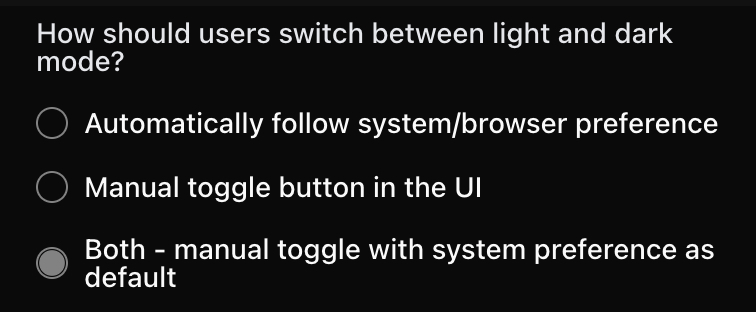
BrainGrid acts as the product manager for development—the questions help focus the scope of changes. Neither Cursor nor Windsurf do this out-of-the-box. Sometimes these questions surface new features (like a toggle switch), but that often improves the final result.
The BrainGrid requirement can be turned into tasks that are easily picked up by both Windsurf's and Cursor's AI Agents to build the code.
In the case of adding dark mode to Formbricks, BrainGrid came up with 9 tasks that must be completed:
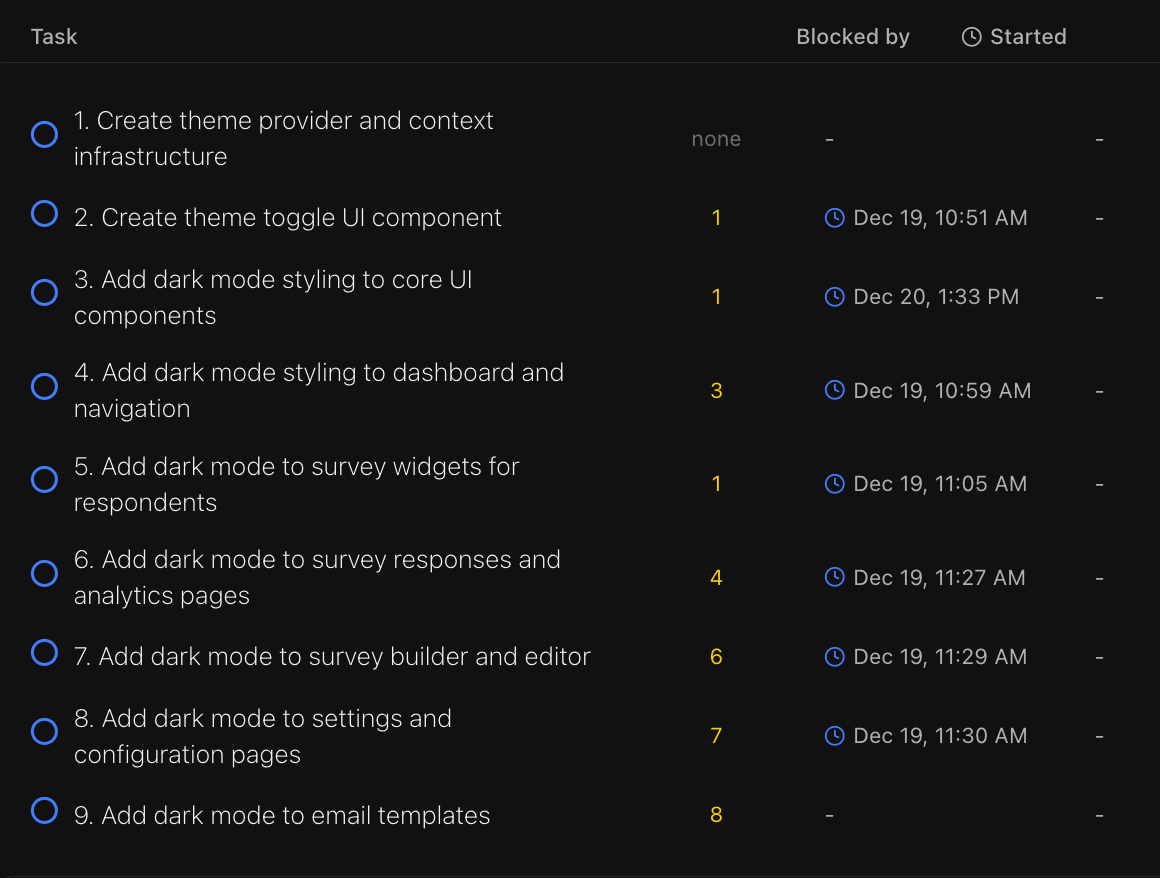
With these tasks in hand, we can use Cursor and Windsurf to implement the feature.
#Which One is Better: Cursor or Windsurf?
Both Cursor and Windsurf supply similar backend LLM models for writing code. The results are generally very similar, so which tool is better will generally fall on the way your team works.
- If you are a single developer building code, focusing on the local context of your code - Cursor is easier and faster to work with.
- If building on complex codebases, and collaborating with your team, Windsurf might be the better choice.
But, perhaps you'd want to see a real life showdown on adding a feature to an existing codebase. Let's use the tasks created by BrainGrid, and see what Cursor and Windsurf produce.
#The Workflow Showdown
With requirements and tasks prompts created, we can apply them to both Cursor and Windsurf to see which better applies our requirement - adding dark mode to our service.
In order to leverage the BrainGrid MCP, it must be installed via the instructions in the documentation.
To leverage the BrainGrid requirements, we simply ask the agent to build the tasks in Req-1. The Agent 'knows' that means BrainGrid, and uses the BrainGrid MCP to connect to BrainGrid and retrieve the tasks.
#Cursor
Cursor read in the 9 tasks, and proceeded to complete them, one after another. After completing 3 tasks, it provided an update with details on how the previous three tasks had been completed. It repeated this again after 6 tasks (For a total of 2 requests to continue.)
Once complete, the code had two compilation bugs. With the error supplied to Cursor, they were quickly addressed. Once up and running, it is clear that, while the dark mode is not complete, it had made pretty good progress (estimated about 80% complete).
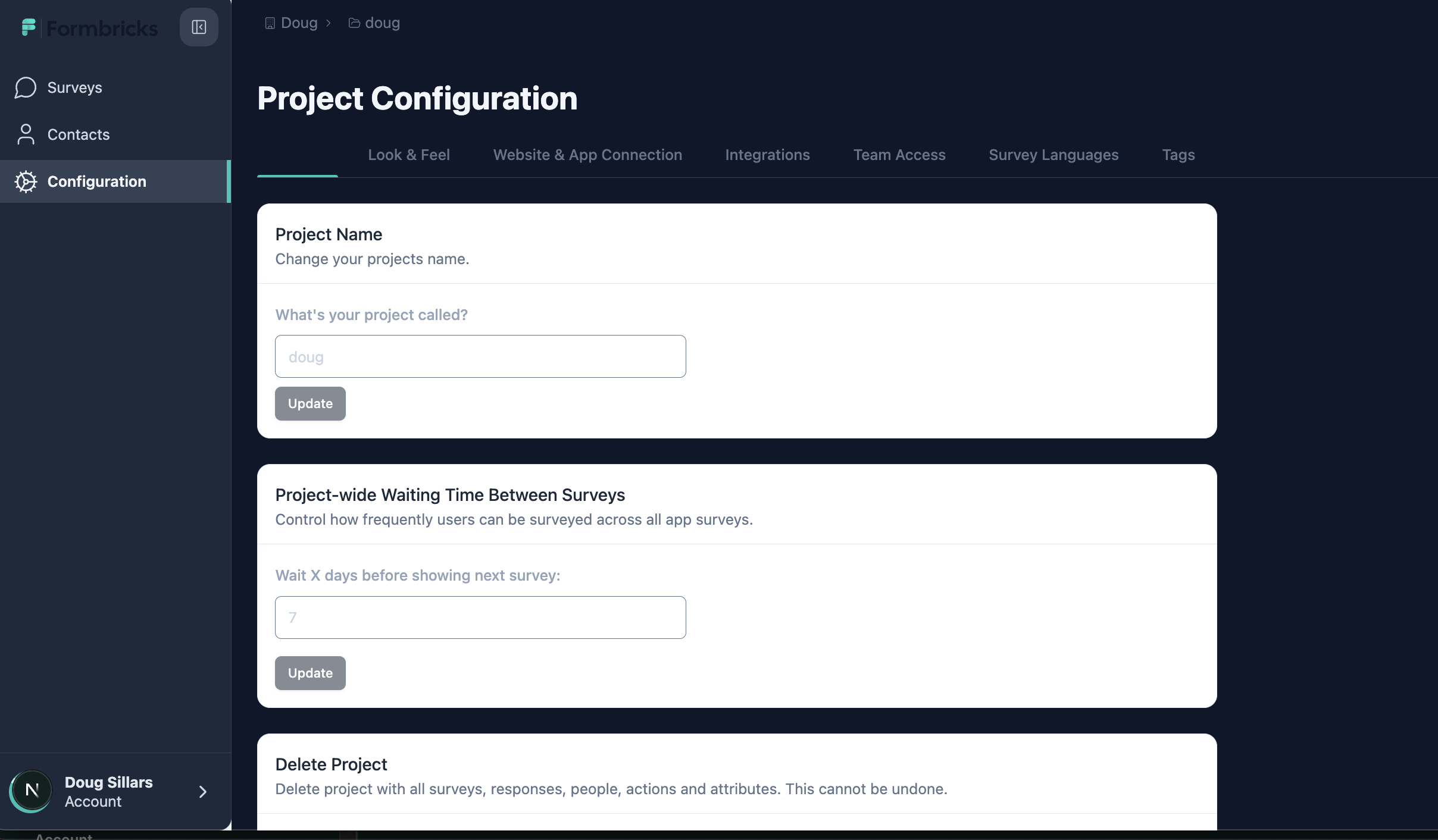
If continuing with this feature, the next steps would be to ensure that:
- All of the boxes are in dark mode.
- make the mode button easier to see in dark mode (it is hidden in the upper right).
- Update the logo image to work better in dark mode.
#Windsurf
Windsurf required a little prompting help to connect to BrainGrid, but ultimately found the 9 tasks to build.
Windsurf's process involved a lot more feedback, making it feel like the process took much longer. For example, Windsurf asked if it should continue after editing each HTML component. There are several dozen HTML components in the Formbricks code, feeling very repetitive (pasting "yes" into the chat window over and over).
Once Windsurf called the job complete, and small compilation bugs were resolved: there was no button to manually switch between light and dark mode (a feature specified in Task 2).
With some additional prompting, the switch was added inside the user settings, but initially the toggle only applied dark mode on the user settings.
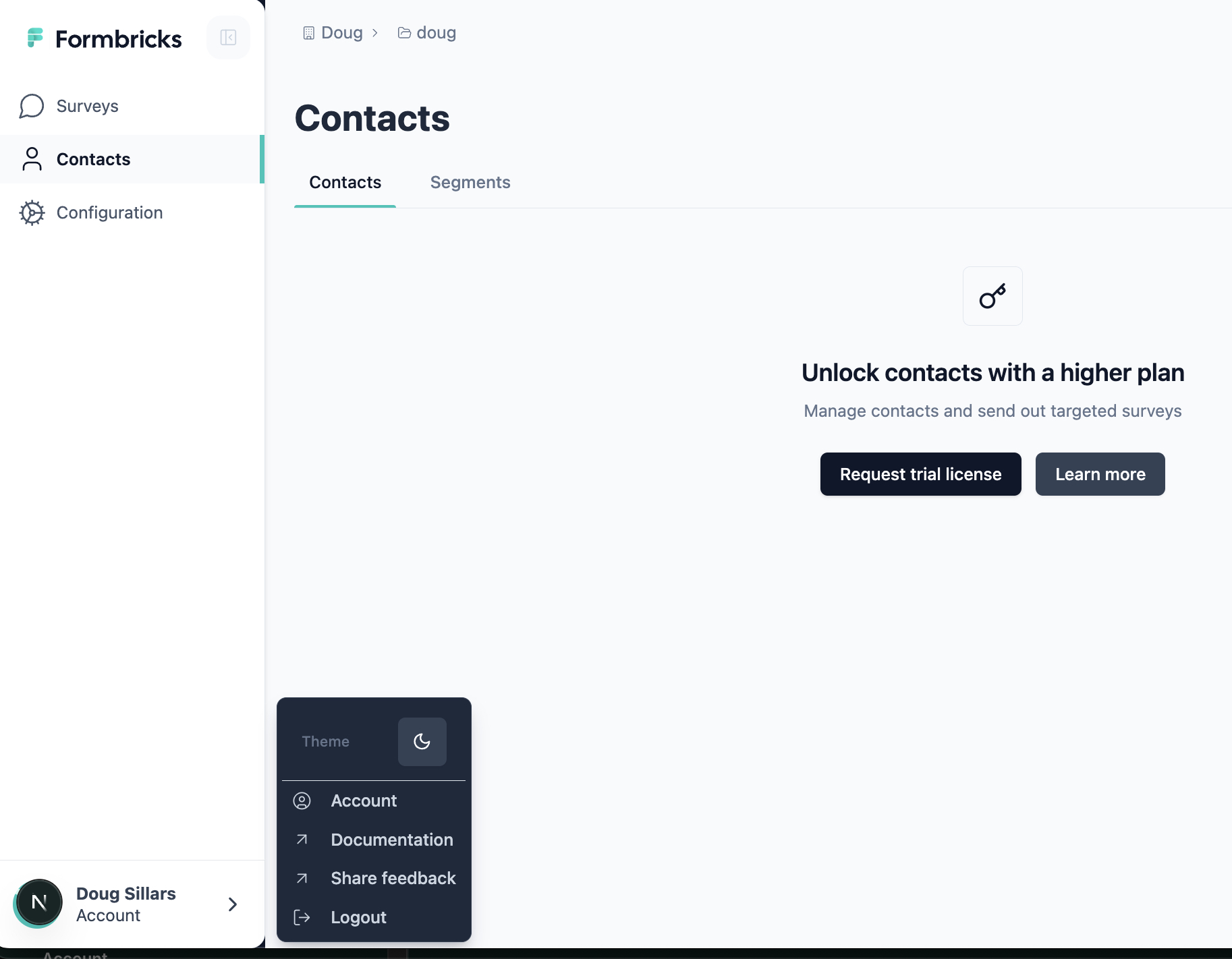
With additional prompting, Windsurf was able to get to a point similar to where we stopped with Cursor
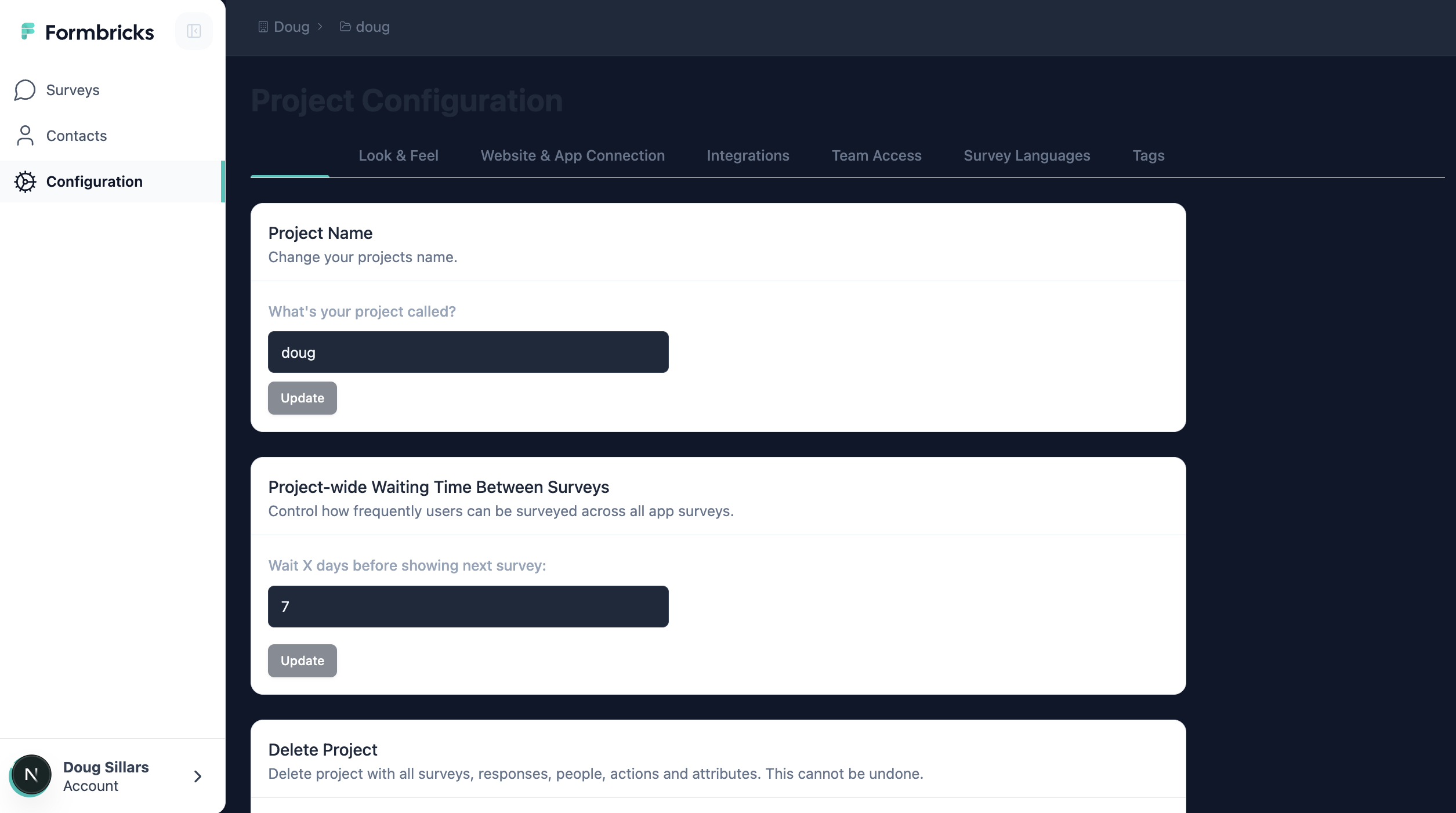
Windsurf eventually got to a similar place as Cursor, but it took many additional prompts to ensure the tasks (marked as completed in BrainGrid) were actually completed.
#TL;DR Cursor vs. Windsurf
Asking Cursor and Windsurf to complete the same tasks on the same codebase provided very different results.
Both Cursor and Windsurf had minor compilation bugs that needed fixing before the code would load. Both tools fixed these quickly.
However, once the pages loaded, it was clear that the Cursor implementation was much closer to the requirements created in BrainGrid. Windsurf's initial "code complete" had no way to change into dark mode, and none of the page was rendered in dark mode.
Out of the box, Cursor was about 80% of the way to a full dark mode implementation. Windsurf's code was 100% light mode without a toggle. Additional prompting was needed to add the toggle, and then more prompting to get all components to appear in dark mode (after manually approving each component through the development process).
#Making the Choice: Cursor vs. Windsurf
Choose Cursor if you want more control over each code change and prefer faster iteration on smaller tasks. In our test, Cursor delivered 80% of the feature in a single pass with minimal prompting.
Choose Windsurf if you prefer a more autonomous AI that plans and executes on its own—just know you may need patience for confirmation prompts on larger codebases.
Either way: Pair your tool with BrainGrid to create detailed requirements first. Our test showed that clear task prompts help both tools deliver better results. Without requirements, you'll waste time re-prompting and debugging code that missed the mark.
#FAQ
#Which one is better, Cursor or Windsurf?
Many teams have found success with both. In our test, Cursor came closer to the desired outcome than Windsurf. But your mileage may vary—your workflow may work better with Windsurf's more autonomous approach.
#Is Cursor cheaper than Windsurf?
Windsurf is $15/month; Cursor is $20/month. The $5 difference is minimal compared to the time you'll save picking the right tool for your workflow.
#What are Cursor and Windsurf used for?
Both are AI-powered development environments that help you write, modify, and refactor code using natural language prompts. They're especially useful for shipping features faster when you're not a full-time engineer.
About the Author
Doug has been helping developers build across mobile, DevOps, and AI for the last 20+ years. An O'Reilly author, international speaker, and a prolific blogger, he relishes in simplifying the complex.
Want to discuss AI coding workflows or share your experiences? Find me on X or connect on LinkedIn.
Keep Reading


Ready to build without the back-and-forth?
Turn messy thoughts into engineering-grade prompts that coding agents can nail the first time.
Re-love coding with AI