
Windsurf MCP Servers: Setup Guide + Best Servers (2026)
Configure MCP servers in Windsurf step by step. Top servers for developers (Supabase, GitHub, BrainGrid) and fixes for common config issues.
Every time Windsurf's AI writes database code, it guesses at your schema. Every API call gets placeholder responses you'll need to fix manually. That copy-paste cycle kills your momentum—and it doesn't have to be this way.
Model Context Protocol (MCP) servers connect Windsurf to your actual databases, APIs, and external services. Instead of generating boilerplate that needs fixing, Windsurf's agents query your real systems and write code that works the first time.
In this guide, you'll learn what MCP servers are, how to set them up in Windsurf, and which servers will help you ship faster.
#What is MCP in Windsurf?
MCP servers are bridges between Windsurf and external services. They give Windsurf's agents context beyond your codebase—databases, APIs, cloud infrastructure, and more.
After connecting a database MCP server, Windsurf's agents can examine your actual tables and columns. The code it generates is based on real queries that retrieve data correctly, and does not rely on placeholder SQL that must be manually updated.
#Why MCP Matters for Shipping Faster
The same pattern applies across your entire stack. An API MCP server lets Windsurf call actual endpoints and write code that correctly parses real responses. A GitHub MCP server gives context about open issues and PRs.
Without MCP, you're stuck fixing the same boilerplate over and over—copying real values into placeholder code. With MCP, the agents generate code that works the first time, letting you ship faster with fewer manual fixes.
#How to Set Up MCP Servers in Windsurf
Many MCP servers are available for Windsurf. Some install directly from the MCP Marketplace with a few clicks, while others require manual JSON configuration.
#Installing from the MCP Marketplace
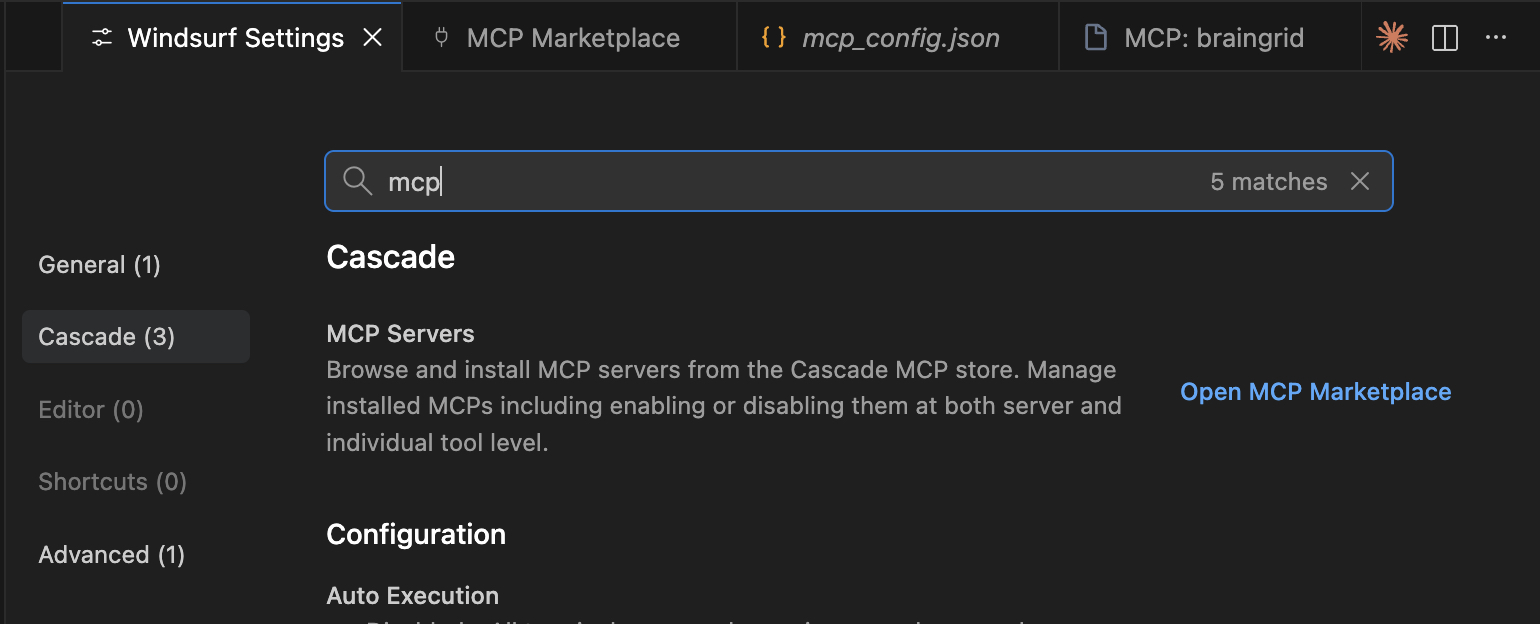
To access the MCP Marketplace, open Windsurf Settings (on Mac: Windsurf → Settings → Windsurf Settings or press ⌘,). Search for "MCP" and click the link to open the Marketplace.
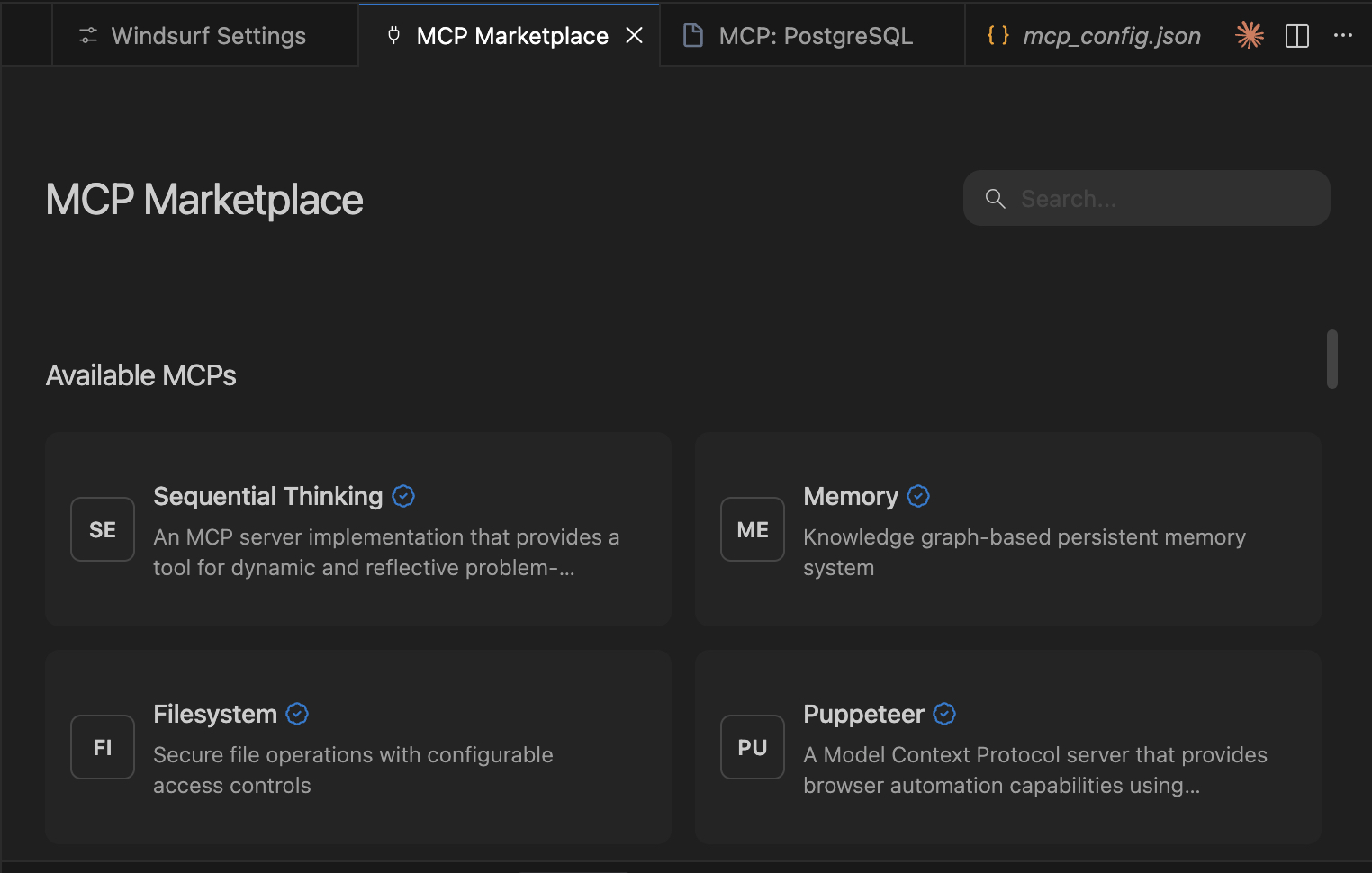
The marketplace offers many MCP servers ready to install.
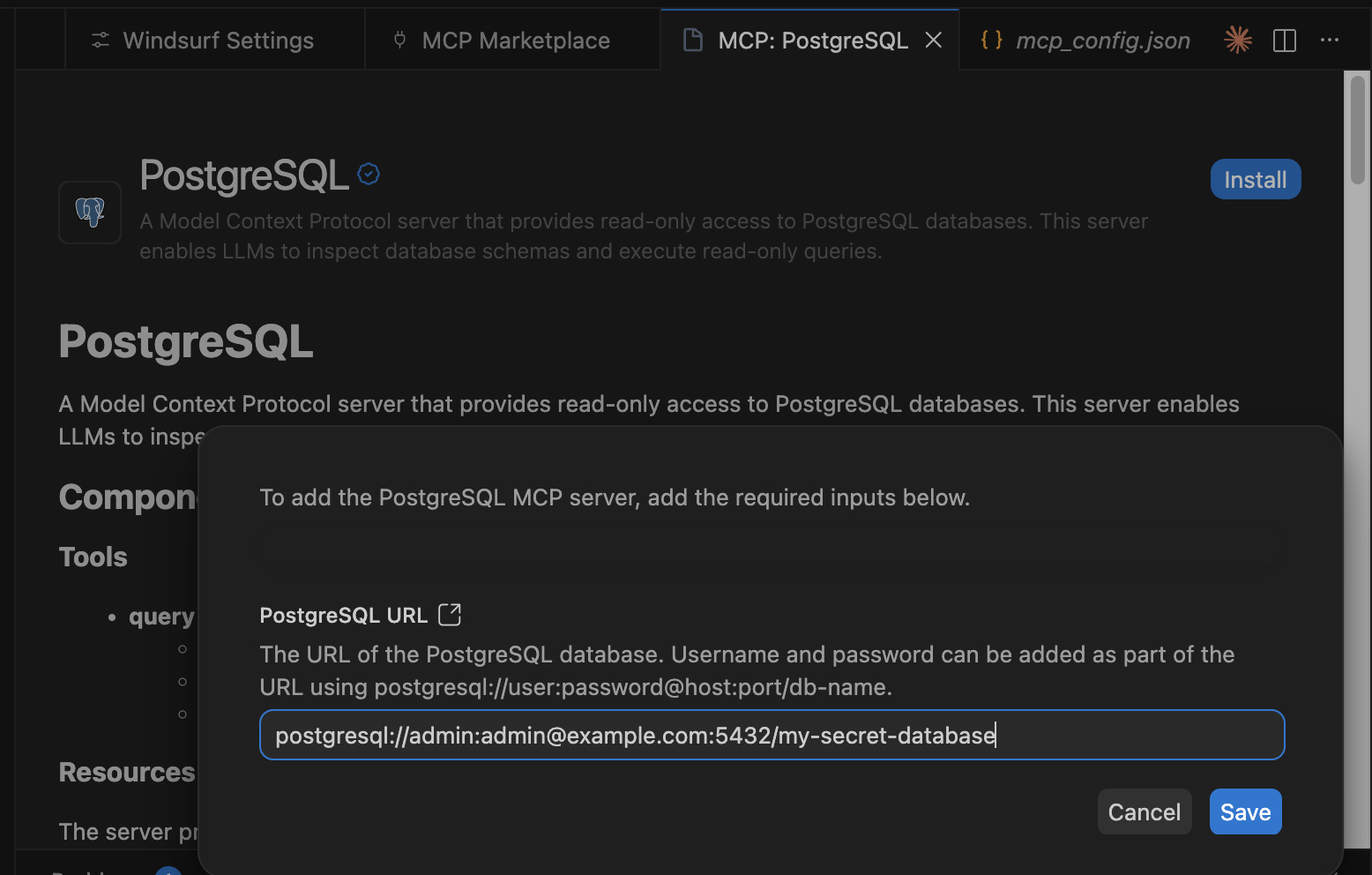
For example, the PostgreSQL MCP server walks you through connection setup—host, port, credentials—and automatically populates the JSON config when complete.
#Installing MCPs manually with JSON
If your MCP server isn't in the Marketplace, you can add it manually by editing the mcp_config.json file. Access this file from the Marketplace by clicking the gear icon.
Here is an example mcp_config.json file with two MCP servers set up, BrainGrid, and the PostgreSQL set up from the marketplace:
1{
2  "mcpServers": {
3    "braingrid": {
4      "args": [
5        "-y",
6        "mcp-remote@latest",
7        "https://mcp.braingrid.ai/mcp"
8      ],
9      "command": "npx"
10    },
11    "postgresql": {
12      "args": [
13        "run",
14        "-i",
15        "--rm",
16        "mcp/postgres",
17        "postgresql://admin:admin@example.com:5432/my-secret-database"
18      ],
19      "command": "docker",
20      "disabled": false,
21      "env": {}
22    }
23  }
24}
This JSON file includes servers installed via the Marketplace as well as manually added ones. The Marketplace simplifies setup by properly formatting the JSON entry for you. The PostgreSQL MCP server creates a small local Docker container with Postgres utilities and your database connection details.
For BrainGrid MCP installation, follow the official setup guide.
#Windsurf MCP Configuration Format
Each MCP entry specifies a command (like npx or docker) and args (the arguments to pass). Windsurf runs these commands when it starts, establishing the MCP server connections.
#Top MCP Servers for Windsurf Developers
- Databases: There are MCP servers for most major databases and DB-as-a-service platforms (MySQL, postgres, MongoDB, Redis, Neon, etc.)
- CloudOps: AWS and Heroku MCP servers give Windsurf insight into how the application is deployed and configured in the cloud. Additionally access to logs and environment specific behavior can help Windsurf improve reliability.
- GitHub: Agents can read pull requests, inspect issues, and understand commit history. This repository content does not live in the codebase, but influences how the code should change.
- Stripe: Visibility into billing flows, customers, subscriptions, invoices, and webhooks. Agents can debug and reason about how the billing logic interacts with the codebase.
- BrainGrid: Takes vague development ideas, turns them into explicit requirements, and breaks those requirements into structured tasks the agents can execute.
- Swagger: When agents are able to read the API specs, they can build to existing endpoints, and parse the results in based on actual responses from the API. No more hallucinated or boilerplate API code to be fixed.
Note that each MCP provides a number of tools to Windsurf, and that Windsurf places a cap of 100 tools that can be active. This might mean enabling and disabling MCPs during different phases of coding.
#BrainGrid MCP: Spec-Driven Development in Windsurf
BrainGrid is an AI product manager that helps developers plan, specify, and build new features. Often, developers jump right in and start prompting before they have a clear picture of what they're building. Running those initial ideas through BrainGrid turns them into structured requirements.
For example, say you want to add a billing flow to your application. BrainGrid analyzes your existing code and asks clarifying questions: which payment providers, what subscription tiers, how to handle failures. These answers become a requirements document your team can approve—spec-driven development. BrainGrid then breaks the requirements into implementation tasks.
The BrainGrid MCP lets Windsurf access these requirements and tasks directly. Instead of copying prompts into the chat, Windsurf reads the full context and builds the feature.
The result: agents build exactly what you specified, with less cleanup afterward. Less context-switching, faster shipping.
#Troubleshooting Common Windsurf MCP Issues
- Command not found: If Docker isn't running locally, Docker-based MCPs will fail. Start Docker first.
- Missing dependencies: Some MCPs require packages like
mcp-remote. Install them before configuring. - Changes not taking effect: After installing new dependencies, restart Windsurf to pick up the changes.
#Start Shipping Faster Today
MCP servers give Windsurf's agents the full picture: databases, APIs, issues, designs, and more. With this context, the code they produce is higher quality and far less likely to need the manual fixes you've come to expect from AI-generated code.
When agents build closer to what you actually need, you ship faster. Less time fixing, more time launching.
Ready to go further? BrainGrid adds spec-driven development to your workflow—turning vague ideas into structured requirements that generate precise prompts for Windsurf's agents.
#Frequently Asked Questions
What is MCP in Windsurf?
MCP (Model Context Protocol) gives Windsurf's agents context beyond your codebase. This includes cloud services, databases, API specifications, or any third-party service that provides insight into how your application works.
How do I configure MCP servers in Windsurf?
Use the MCP Marketplace for one-click installs, or manually edit the mcp_config.json file with the server configuration.
Where is the Windsurf MCP config file located?
The config file is at ~/.codeium/windsurf/mcp_config.json. The easiest way to access it is through the MCP Marketplace by clicking the settings gear icon.
What MCP servers work with Windsurf?
Any MCP server using stdio (local) or http (remote) transport works with Windsurf.
How does Windsurf MCP compare to Cursor MCP?
Both support MCP, but they use it differently. Cursor treats MCP as a transactional tool—query and respond. Windsurf integrates MCP into its agentic workflow, using the context for multi-step planning and chaining data across tasks.
Why is my Windsurf MCP server not working?
Check the troubleshooting section above. The MCP Marketplace shows connection status—look there for specific error messages to diagnose the issue.
About the Author
Doug has been helping developers build across mobile, DevOps, and AI for the last 20+ years. An O'Reilly author, international speaker, and a prolific blogger, he relishes in simplifying the complex.
Want to discuss AI coding workflows or share your experiences? Find me on X or connect on LinkedIn.
Keep Reading

Ready to build without the back-and-forth?
Turn messy thoughts into engineering-grade prompts that coding agents can nail the first time.
Re-love coding with AI